
Stop Paying for Cloud Subscriptions. Take Back Control.
The ultimate offline-first desktop application for project planning, execution, Earned Value Management, and Monte Carlo risk analysis. Own your data, manage timelines securely on your local machine, and deliver projects on budget.
Most Valuable Propositions
Why project managers, engineers, and enterprise contractors rely on PlanIFlow.
Zero Cloud Dependency & Telemetry
No external databases, no cloud synchronization, no user tracking. Your sensitive project timelines and financial costs remain securely stored on your local disk.
No Recurring Subscription Fees
Eliminate ongoing SaaS subscription costs. Gain access to enterprise-grade tools like EVM, Monte Carlo risk simulation, and project baselining with a perpetual open-source tool.
Instant Native Performance
Powered by PyQt6 and Python 3.11+, experience sub-millisecond table rendering and instant filtering across thousands of project activities with zero web latency.
Core Minimum Viable Product
Explore the comprehensive analytical modules built right into PlanIFlow.
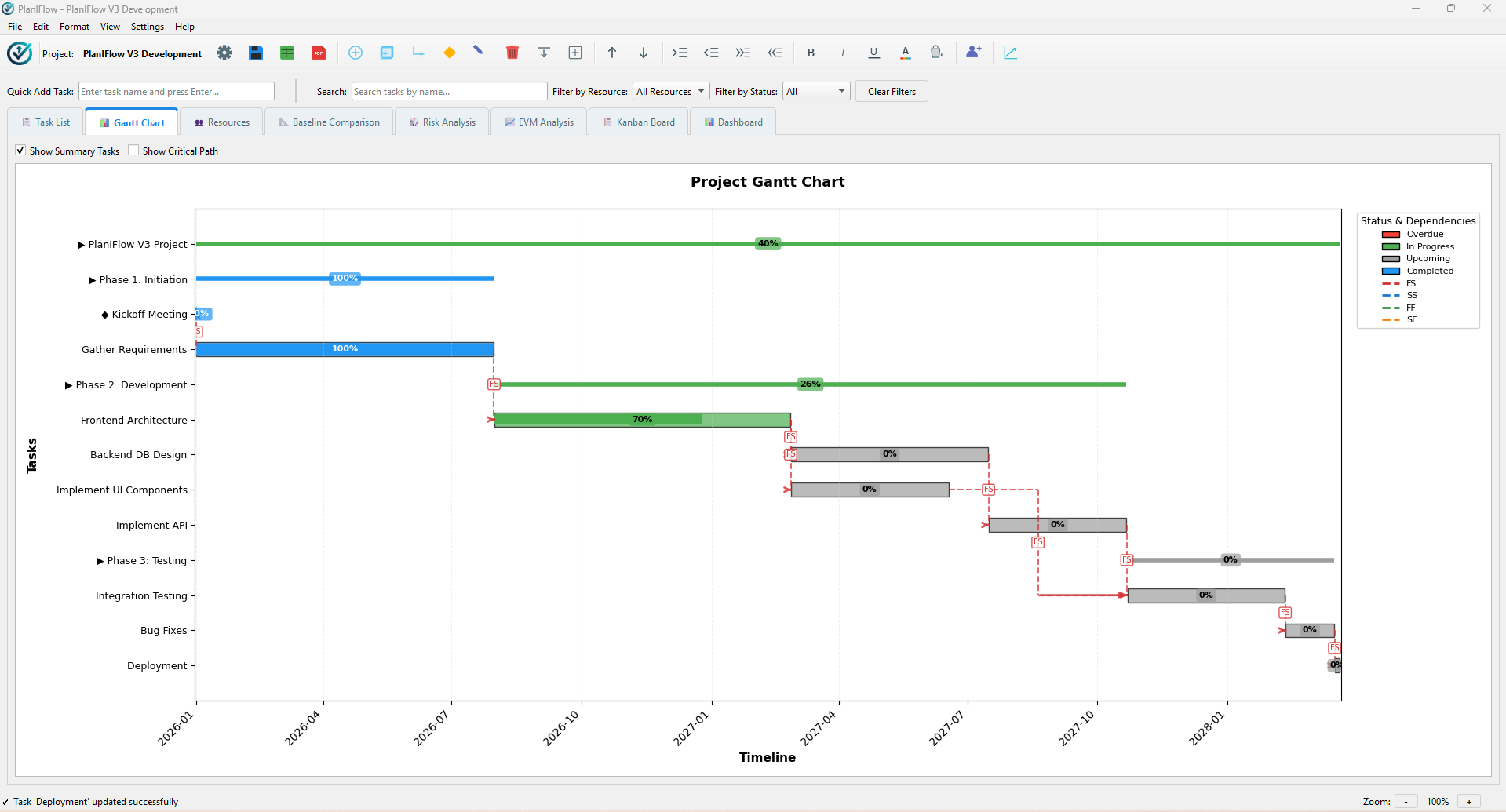
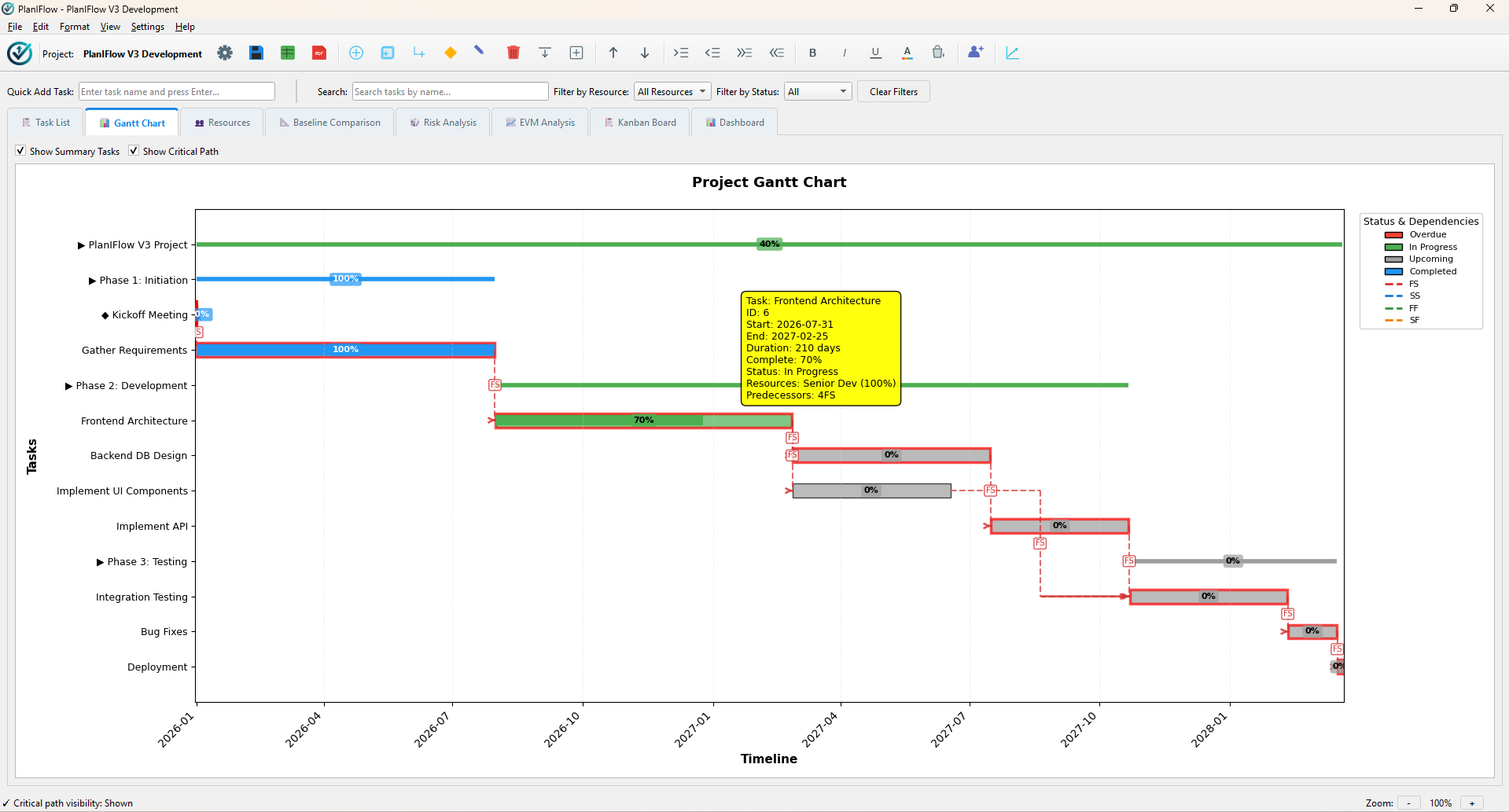
Visualize & Control Your Schedule Timeline
Real-time timeline rendering powered by Matplotlib and PyQt. Visualize activities, milestones, and summary task relationships with precision.
- Standard Dependency Notation: FS, SS, FF, SF with lead & lag times
- One-click Critical Path Highlighting (Red zero-slack tasks)
- Interactive zoom controls (Day / Week / Month timeline scale)
- Milestone markers and summary task progress bars
Agile Execution & Visual Workflows
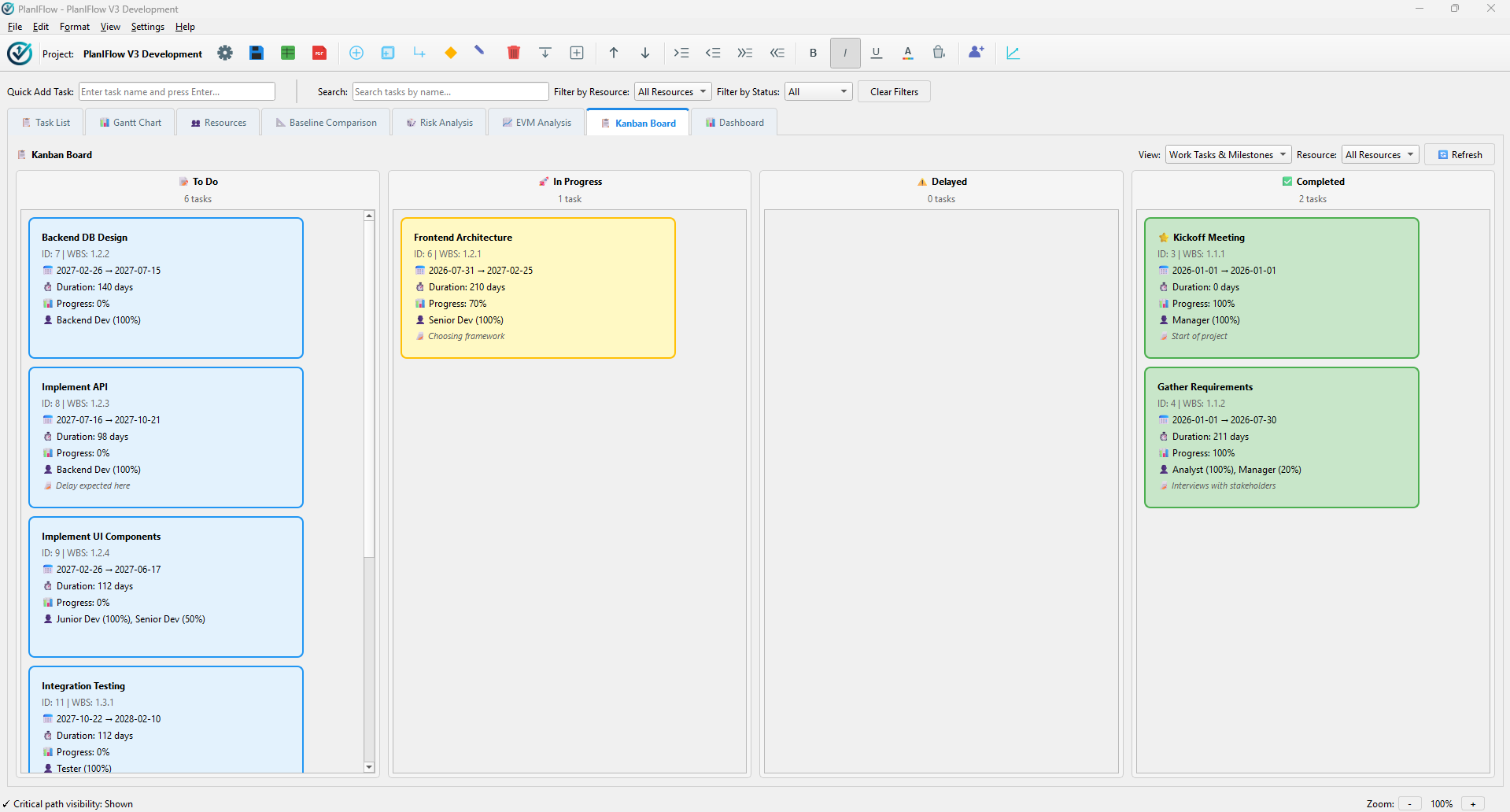
Streamline team tasks with a responsive, interactive Kanban board featuring drag-and-drop card movements and multi-dimensional filtering.
- 5 Status Columns: 📝 To Do, 🚀 In Progress, ⚠️ Delayed, 🚫 Blocked, ✅ Completed
- Task WBS, dates, completion %, resource badges, and card notes
- Task-level and resource-level quick filtering
- Inline card editing dialogs for rapid updates
Monte Carlo Schedule Risk Analysis
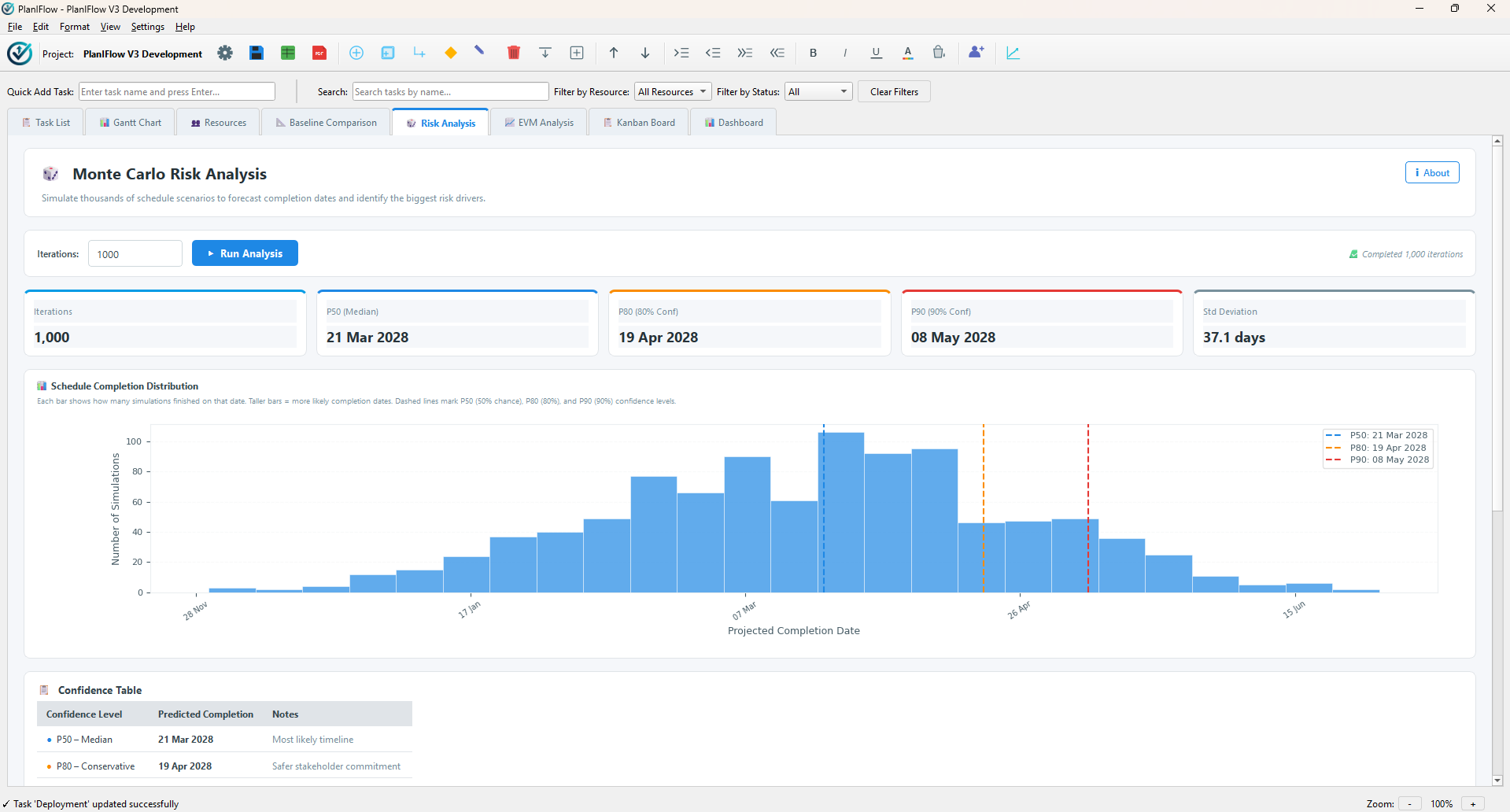
Move beyond single-point estimates. Run up to 10,000 statistical simulations to forecast realistic project completion probabilities under uncertainty.
- Statistical Confidence Metrics: P50, P80, and P90 completion dates
- Identification of top risk-driver activities influencing project variance
- Probability distribution graphs and cumulative frequency charts
- Optimistic, Most Likely, and Pessimistic duration modeling
Earned Value Management (EVM) Metrics
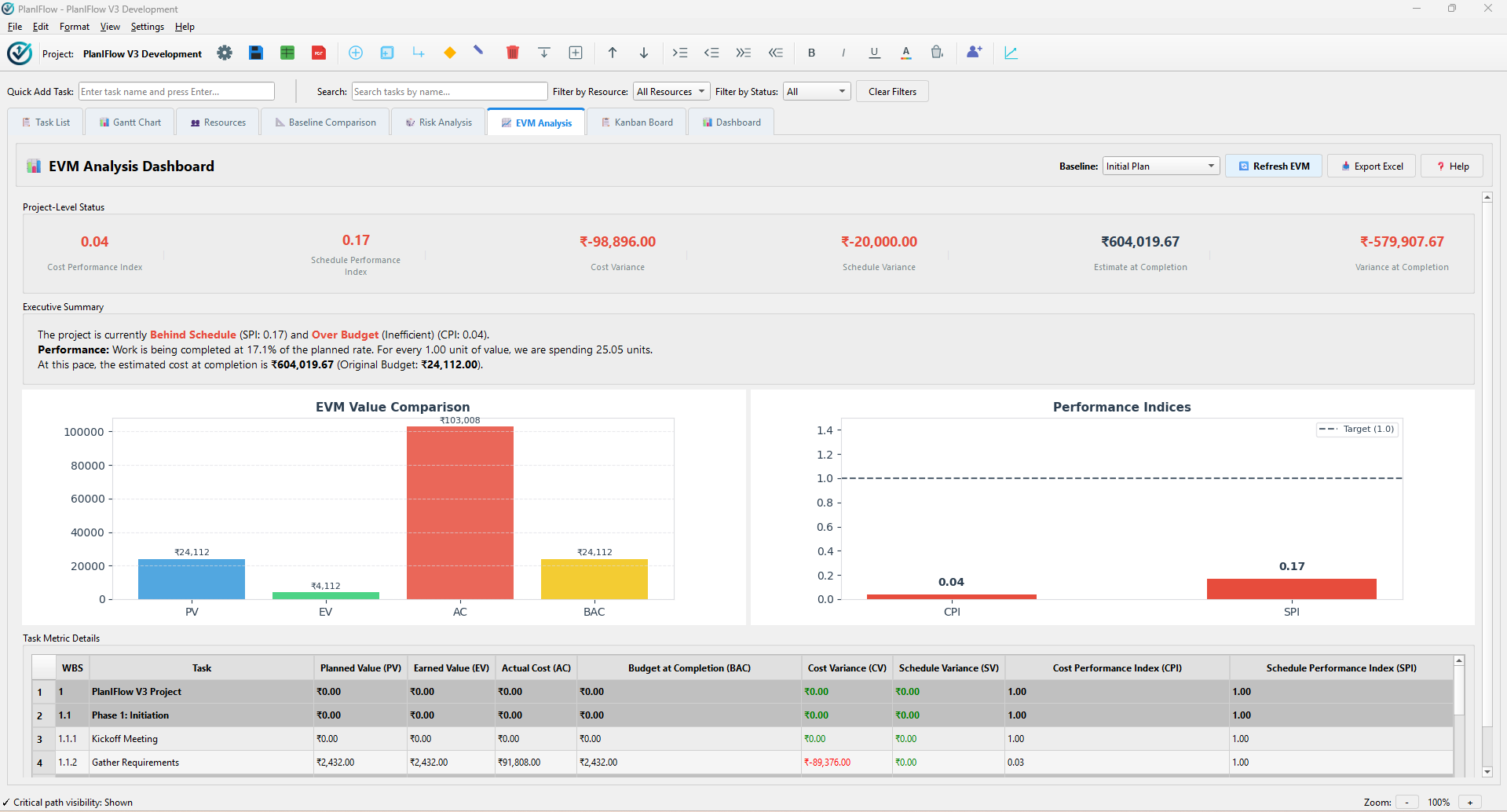
Monitor project schedule and budget health using ANSI/EIA 748 standard Earned Value Management performance indices.
- Metrics: PV (Planned Value), EV (Earned Value), AC (Actual Cost)
- Indices: Cost Performance Index (CPI) and Schedule Performance Index (SPI)
- Variances & Estimates: CV, SV, Estimate at Completion (EAC), Variance at Completion (VAC)
- Plain-English health summary reports & multi-sheet Excel exports
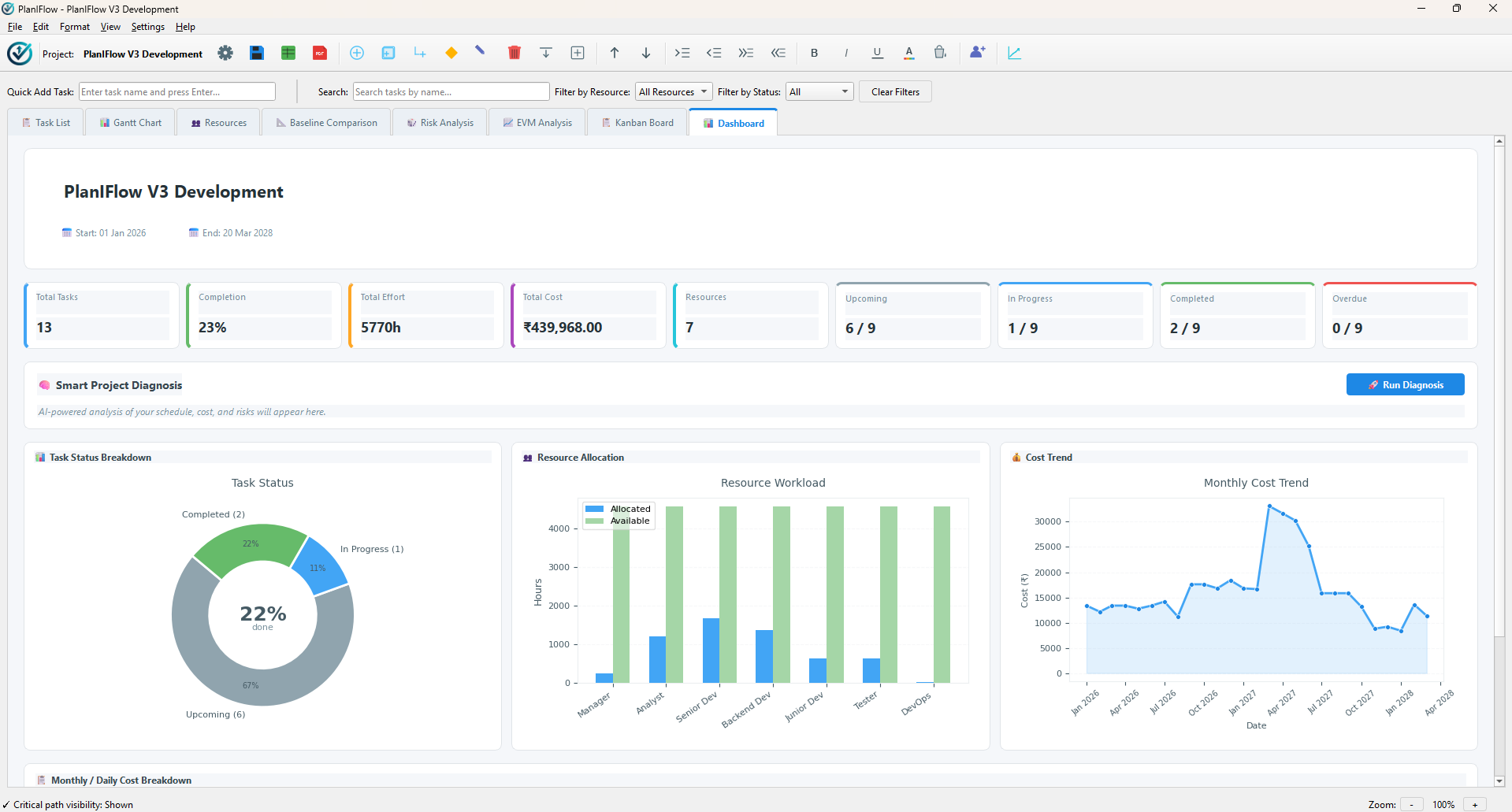
Smart Project Health Diagnosis
An intelligent automated audit engine that synthesizes schedule logic, Monte Carlo risk findings, and EVM performance into an executive summary report.
- Automated Schedule Health Checks (dangling tasks, excessive lag, missing predecessors)
- Combined Schedule & Cost Variance Executive Assessment
- Plain-English action recommendations for project managers
- One-click status report export to PDF and Excel
Complete Feature Suite
Everything you need for end-to-end desktop project management.
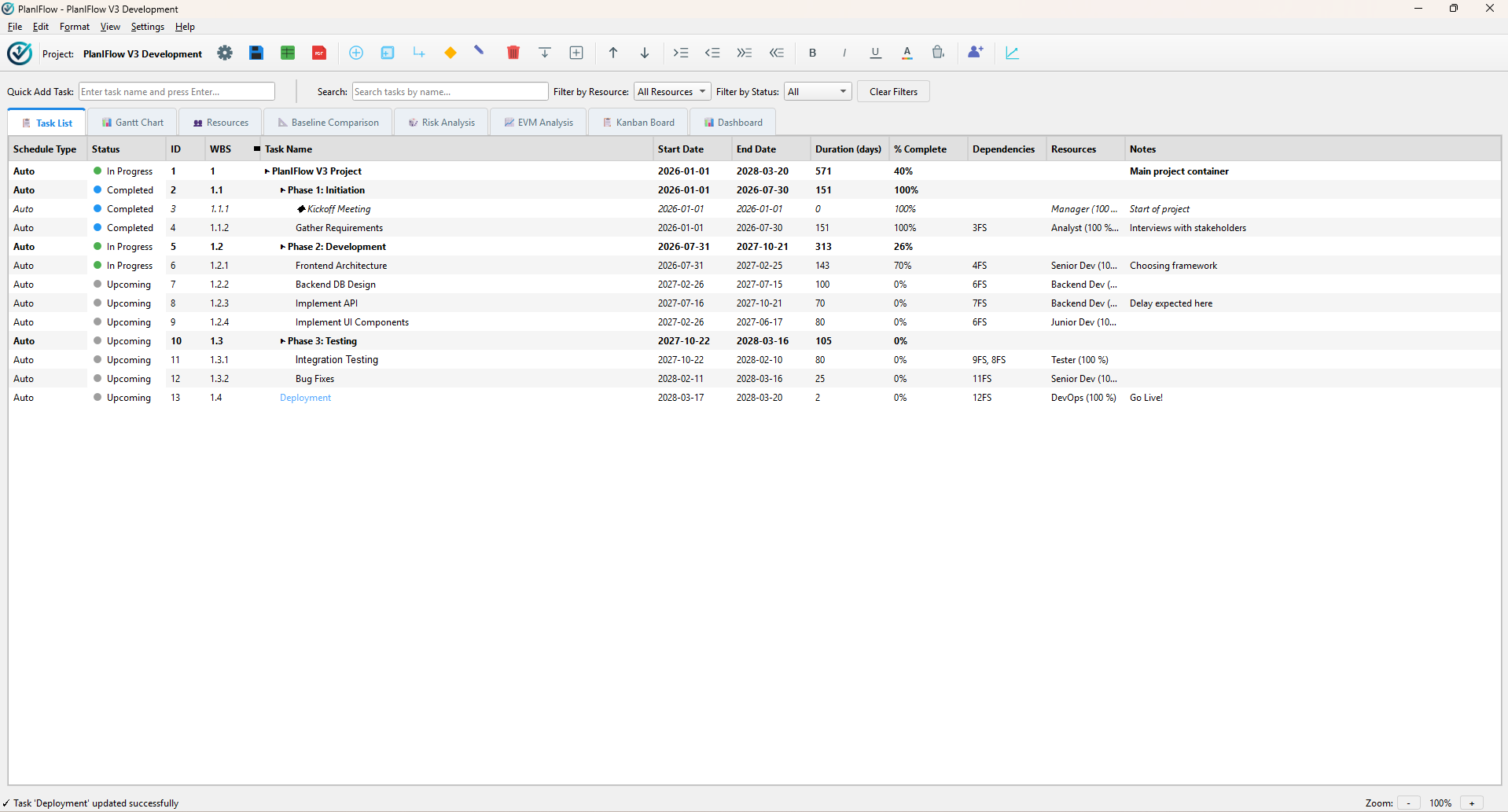
Bulk Add & Bulk Edit Tasks
Quickly populate projects by pasting multiline task lists (Ctrl+Shift+D). Select multiple tasks to edit completion %, durations, resources, or notes simultaneously.
Hierarchical WBS Structure
Build multi-level Summary Tasks and Sub-tasks. Restructure project hierarchies easily using keyboard shortcuts: Tab (Indent) and Shift+Tab (Outdent).
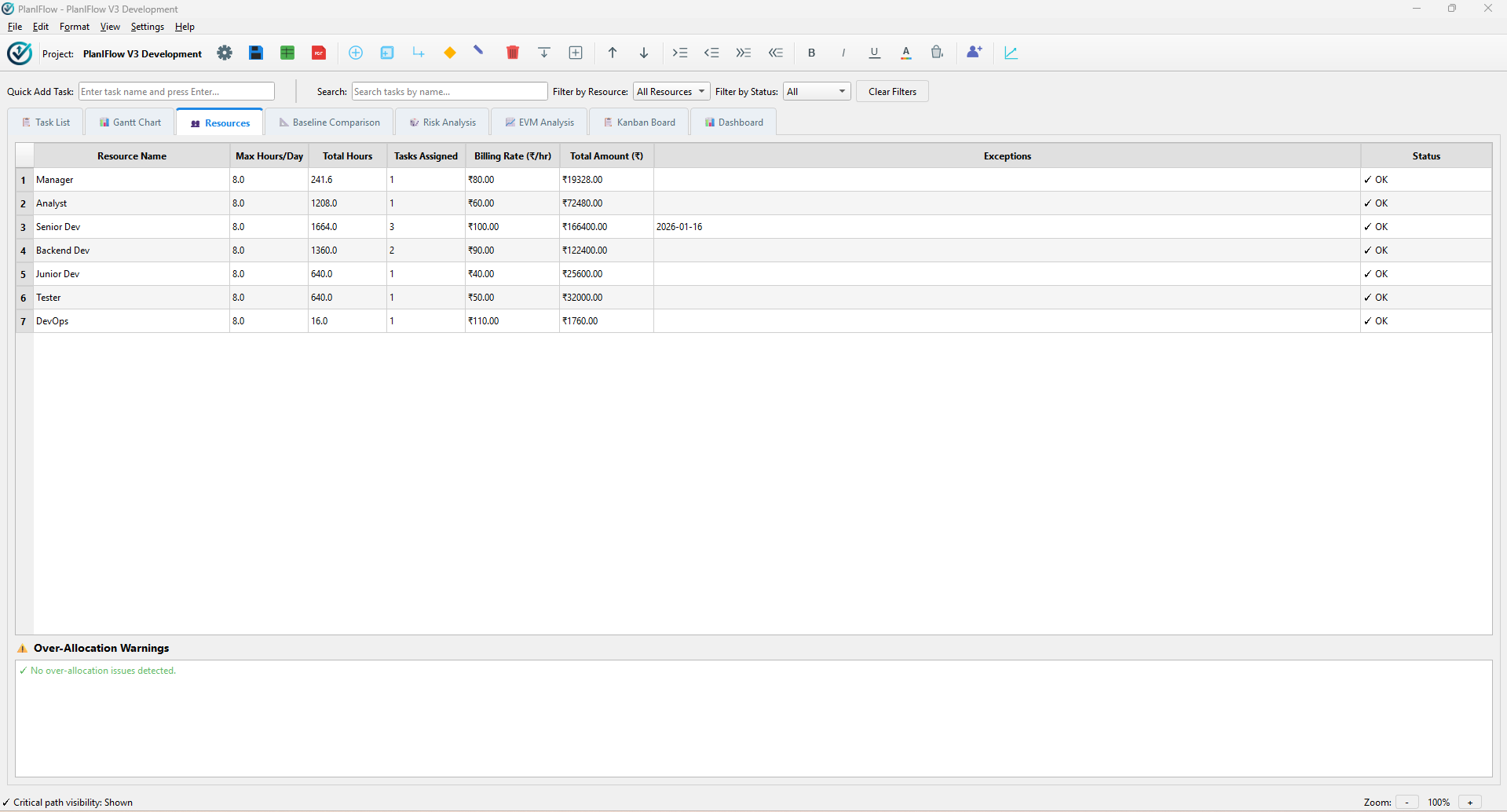
Resource Exception Days
Define resource-specific leaves, vacations, and blackout date ranges. Scheduling logic automatically adjusts activity timelines based on resource availability.
Project Baselining (11 Snapshots)
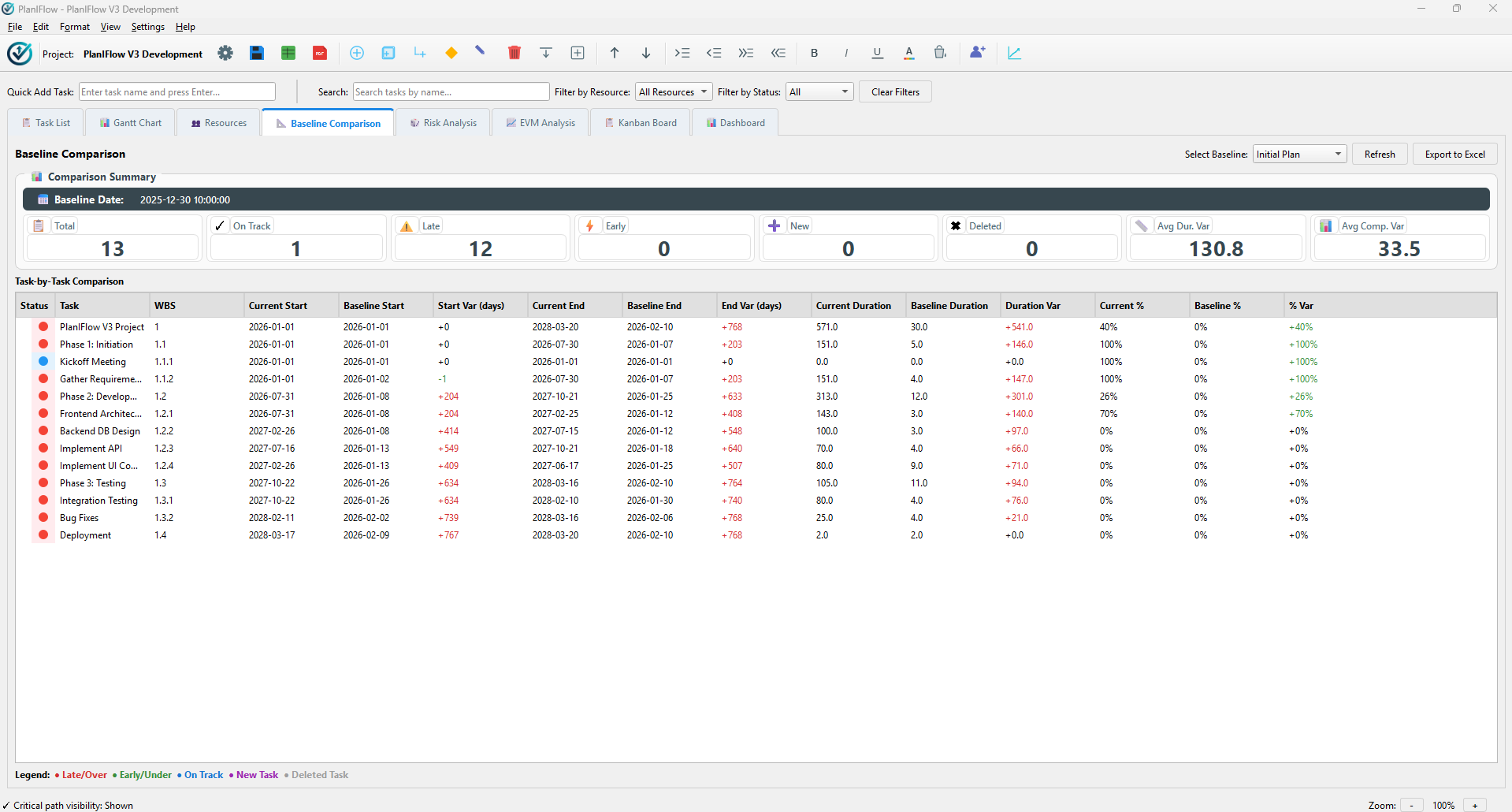
Capture and store up to 11 baseline snapshots per project. Compare active schedules against historical baselines in the variance tracking dashboard.
Multi-Currency Support
Configure project-wide currency symbols (USD $, EUR €, GBP £, JPY ¥, INR ₹, etc.) reflected across financial cost tables, EVM, and exported reports.
Rich File Export Suite
Export projects to high-fidelity JSON files, multi-sheet formatted Excel workbooks (.xlsx), and publication-ready PDF documents with Gantt charts.
Full Undo & Redo History
Never worry about accidental edits. Complete action stack support for task edits, hierarchy changes, and resource assignments via Ctrl+Z and Ctrl+Y.
Days & Hours Duration Units
Switch project estimation units between 'Days' and 'Hours' for high-precision operational task scheduling.
High-Contrast Dark Theme
Designed for prolonged engineering sessions with sleek dark mode aesthetics and color-coded status badges.
Technologies & Architecture
Engineered with high-performance Python 3.11+ libraries and a modular architecture.
Python
Core programming language providing robust data structures and cross-platform compatibility.
PyQt6
Native GUI framework delivering desktop widgets, tree tables, drag-and-drop Kanban, and dialogs.
Pandas
High-performance data manipulation engine for schedule matrices, cost aggregations, and baseline tracking.
Matplotlib
Gantt chart rendering engine with custom bar formatting, milestone markers, and critical path lines.
Openpyxl
Advanced Excel report exporter generating styled multi-sheet financial and schedule workbooks.
ReportLab
PDF document generation engine crafting printable executive project reports.
NumPy
Numerical array processing powering 10,000-iteration Monte Carlo probability distributions.
Jsonschema
Strict schema validation enforcing local project JSON data integrity and blocking corrupted imports.
Application Interface Gallery
Click any screenshot to view in full resolution.
Formal Security Assessment
Assessment: LOW RISK – SECURE FOR DEPLOYMENT
PlanIFlow underwent a comprehensive security audit across all core Python source files using SAST (bandit, pip-audit, xenon), manual code review, and STRIDE threat modeling.
- Zero Cloud Telemetry: Operating 100% offline. No database server, background cloud sync, or external tracking listeners.
- Strict DoS & Input Validation: Enforced by ProjectValidator hard limits (MAX_TASKS = 10,000, MAX_STR_LEN = 250).
- Secure Auto-Updates: Uses TLS/HTTPS certificate verification and mandatory local SHA-256 hash checksum matching against official release records before executing installers.
- Safe Deserialization: Strict JSON validation via jsonschema. No pickle or eval() code execution.
STRIDE Threat Modeling Summary
| Threat Category | Potential Scenario | Mitigation Strategy | Status |
|---|---|---|---|
| Spoofing | Impersonating GitHub update server | HTTPS/TLS certificate validation enforced via Requests library | ✅ Mitigated |
| Tampering | Manipulating local JSON project files | ProjectValidator schema validation & string sanitization. No macro execution. | ✅ Mitigated |
| Tampering | Modifying installer binary in transit | Local SHA-256 hash calculation compared against trusted release .sha256.txt | ✅ Mitigated |
| Information Disclosure | Leaking sensitive data in crash reports | Sanitized UI exception handlers. Zero automatic crash reporting or telemetry. | ✅ Mitigated |
| Denial of Service | Importing massive file to exhaust RAM | Hard resource limits (MAX_TASKS = 10,000, string length caps) prevent memory exhaustion. | ✅ Mitigated |
🔐 Windows Code Verification Certificate Guide
To verify digital signatures on Windows, download the Code Verification Certificate by Dipta Roy and trust it locally:
- Download and extract Signed_By_Dipta_CodeSigningPublicKey.cer.
- Right-click the certificate → Install Certificate → Select Local Machine.
- Choose "Place all certificates in the following store" → Browse → Select Trusted Root Certification Authorities.
- Complete the wizard. Right-click PlanIFlow_2.8.0.msi → Properties → Digital Signatures tab to confirm: "This digital signature is OK."
Keyboard Shortcuts Cheatsheet
Boost your project management productivity with native keyboard shortcuts.
| Shortcut | Action Description | Scope |
|---|---|---|
| Ctrl+T | Add a new individual Task | Task View / Tree |
| Ctrl+Shift+D | Bulk Add Tasks from multiline list | Task View |
| Ctrl+M | Add Milestone Activity (0 duration) | Task View |
| Ctrl+Shift+T | Add Subtask under selected parent task | Task View |
| Tab | Indent task (demote to subtask) | Task Tree Table |
| Shift+Tab | Outdent task (promote to higher level) | Task Tree Table |
| Ctrl+B / Ctrl+I / Ctrl+U | Format Task text (Bold / Italic / Underline) | Task View |
| Ctrl+Z / Ctrl+Y | Undo / Redo action history | Global Application |
| Ctrl++ / Ctrl+- | Zoom In / Zoom Out timeline scale | Gantt Chart View |
| F5 | Refresh all view widgets and charts | Global Application |
| Ctrl+N / Ctrl+O / Ctrl+S | New Project / Open Project / Save Project | Global Application |
Ready to Master Your Projects Offline?
Join project managers and security-conscious teams using PlanIFlow.
Verified Windows MSI Package
Batch Automation Scripts Reference:
| Script Name | Purpose & Description |
|---|---|
| run.bat | Launches PlanIFlow, initializing Python virtual environment and dependencies automatically. |
| build.bat | Compiles standalone executable using cx_Freeze. |
| build_msi.bat | Generates signed Windows MSI installer package. |
| launch_build_tool.bat | Launches GUI Build Automation Tool (build_automation_gui.py). |
| run_security_scans.bat | Executes security audit suite (bandit, pip-audit, vulture, xenon). |
Or Run From Source:
run.bat
python3 -m venv venv
source venv/bin/activate
pip install -r requirements.txt
python3 main.py